Why Is My IP Address Blocked From Signing Up? The Real Reasons
Why is my IP address blocked on a clean sign-up form? The three checks a site runs on an IP (datacenter range, reputation, shared IP) and how to spot yours.
 Kevin McDonnell 10 min read
In this guide
Your IP address is blocked from signing up because the site checked the address, not you, and one check failed. The IP sits in a datacenter, VPN or proxy range, it carries a bad reputation or blocklist listing, or it is shared with other people whose abuse was counted against it. Each signal looks different and has a different fix.
Test it now
Cloudflare edgeRead at the Cloudflare edge from this request. The homepage adds your provider, network type and the VPN, DNS and WebRTC checks.
Show details
Why is my IP address blocked when the form was clean?
A sign-up block is an IP gate, not a judgment about you. Before a registration form is scored, most large sites look up the connecting address. Which network announces it, and is that network a hosting company? Is the address on a VPN, proxy or Tor list? Does it carry abuse reports, and how many other accounts recently came from it? If a check fails, the response is a soft refusal, such as sign-up unavailable or access denied, rather than an accusation. The site cannot tell a careful person on a bad address from a bot on the same one.
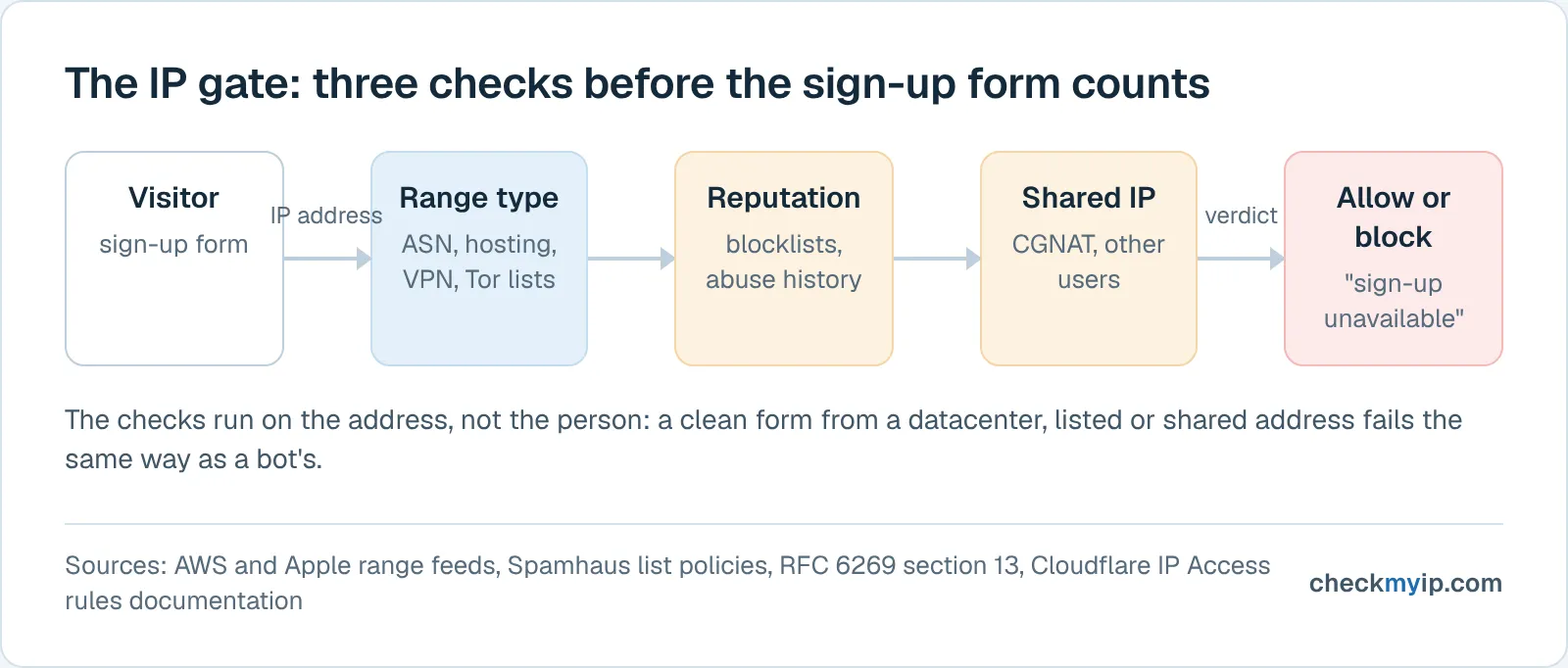
That is why the same form works on mobile data and fails through a proxy: the person did not change, the address did. It is also why the gate is different from an account ban. An IP ban, covered in the what is an IP ban guide, follows something an account did; the sign-up gate fires before an account exists. The "your IP has been temporarily blocked" page shown after too many requests is a third thing, a rate limit, which the temporarily blocked guide walks through error by error.
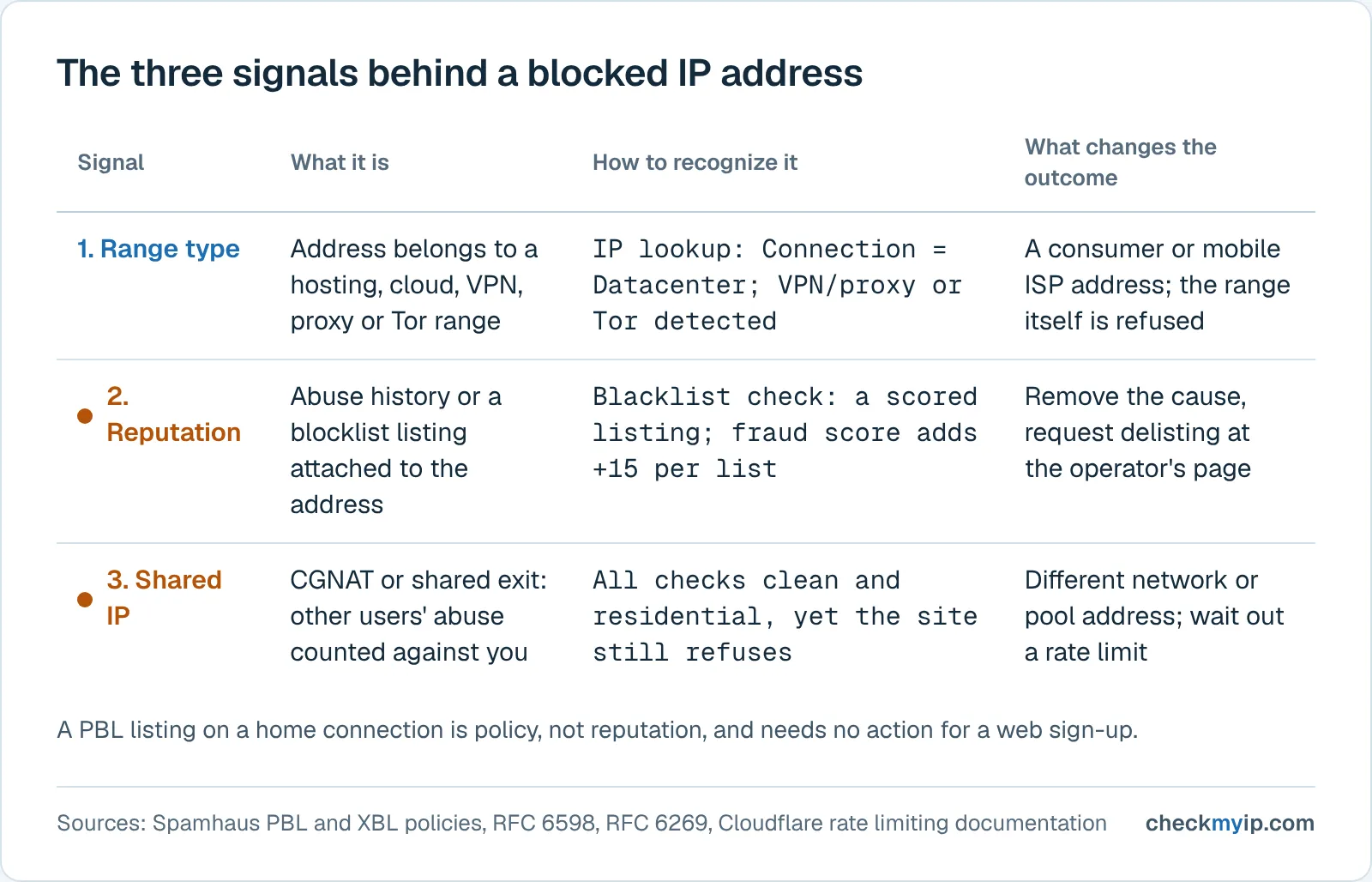
Three signals account for nearly every refusal, and each is checked, and fixed, separately.
Signal 1: your IP is in a datacenter, VPN or proxy range
Range detection asks one question: does this address belong to a network where people live, or where servers live? The answer is in public records. Every address is announced by an autonomous system (ASN) whose registry entry names the operator, so a cloud or hosting address is identifiable without any behavior at all. Cloud providers also publish their own ranges. AWS states that it "publishes its current IP address ranges in JSON format" so that anyone can "identify traffic from AWS" and "allow or deny traffic". Apple publishes the egress ranges of iCloud Private Relay as a downloadable list and notes that most geolocation providers annotate those addresses as "iCloud Private Relay". The Tor Project publishes the current exit-node addresses as a plain-text list.
Commercial VPN and proxy exits run on rented servers in exactly those hosting ranges, and the exits of large providers are collected into published lists. This is the honest answer to "how do websites detect VPN": not by seeing through the tunnel, but by recognizing the address at the far end of it as a server address. Cloudflare's IP Access rules let a site owner block or challenge traffic by IP address, by ASN or by country, so one rule can refuse an entire hosting network. A visitor caught by it sees Cloudflare's error 1006, 1007 or 1008 ("Access Denied: Your IP address has been banned"), whose documented cause is simply that "a Cloudflare customer blocked traffic from your client or browser".
The tell for this signal is consistency: the same site refuses you every time from this address, from any browser, even with a cleared profile, and works immediately from a mobile connection. The residential vs datacenter IP guide explains why the two kinds of address are treated so differently.
Signal 2: your IP address is flagged by reputation and blocklists
Reputation is history attached to an address. Blocklists are its public form: DNS-based lists that mail servers and web applications query to ask "has this address misbehaved?" Spamhaus describes its Exploits Blocklist (XBL) as "individual IPv4 and IPv6 addresses exhibiting signs of compromise", added when there is evidence that a device using the address is infected or insecure. One cause it names is "Free VPN" style applications that turn a customer's device into a proxy. Its Policy Blocklist (PBL) is different in kind: it lists "end-user IP address ranges from which email should never be sent directly", and Spamhaus says these addresses "are not necessarily bad". A PBL listing on a home connection is normal and says nothing about you.
Private reputation scores add more inputs: recent sign-ups, password resets or failed logins from the address, fraud reports, how often it changes hands. The IP reputation guide covers who keeps those scores.
Two properties of blocklists matter here. First, listings outlive the behavior. Spamhaus notes that dynamic addresses are reassigned, so a new user can receive an address that was listed because of the previous one; the address you were handed this morning carries last week's history. Second, some lists describe a range rather than an address. Our blacklist check marks UCEPROTECT Level 2 and 3 results as informational because they describe "the provider's whole range or network, not this address"; a site that treats every listing as equal will not make that distinction.
How to tell which signal hit you: four checks
Run these on the address the site saw: your own, shown on each page when it loads, or a proxy or VPN exit pasted into the lookup box.
- IP lookup. Read the Connection row first: it says Mobile carrier, Broadband (ISP), Residential proxy, VPN, Datacenter, Proxy, Tor or Unknown, with a confidence level and the reason (for example a hosting or cloud range). Below it, the Network identity panel marks VPN / proxy, Tor exit node, Hosting / data center, iCloud Private Relay as detected or not, shows whether the address is listed on any blocklists, and the ASN row names the operator. A Datacenter connection or a detected VPN flag is Signal 1.
- Proxy check. The verdict (residential, mobile, business, data center, VPN, proxy, Tor or relay) comes with the evidence rows that produced it: Tor exit list, VPN provider ranges, open-proxy blocklists, hosting ranges, Private Relay, network type. For your own connection it adds browser-side consistency checks (device time zone against the address, browser languages against the country, WebRTC address, DNS resolver network), the secondary signals a site uses to confirm a suspected tunnel.
- IP fraud score. A 0 to 100 score built only from the published signals the page lists, with a fixed weight per signal and the formula version shown: a Tor exit, a known VPN range, open-proxy evidence, a hosting range, a Private Relay egress, a botnet command server listing, and each scored blocklist listing. The page states that this "is not a probability of fraud" and that "a shared VPN exit or a clean cloud server inherits its range's history". It shows which signals a scoring site could react to, not a verdict.
- Blacklist check. Ten public DNS blocklists queried in parallel, one row each, with the list's category (spam sources, open proxies, attack sources), the result, the decoded return code and the operator's removal page. Allocation-wide listings are flagged as informational. A scored listing here is Signal 2, and the row tells you where to request delisting.
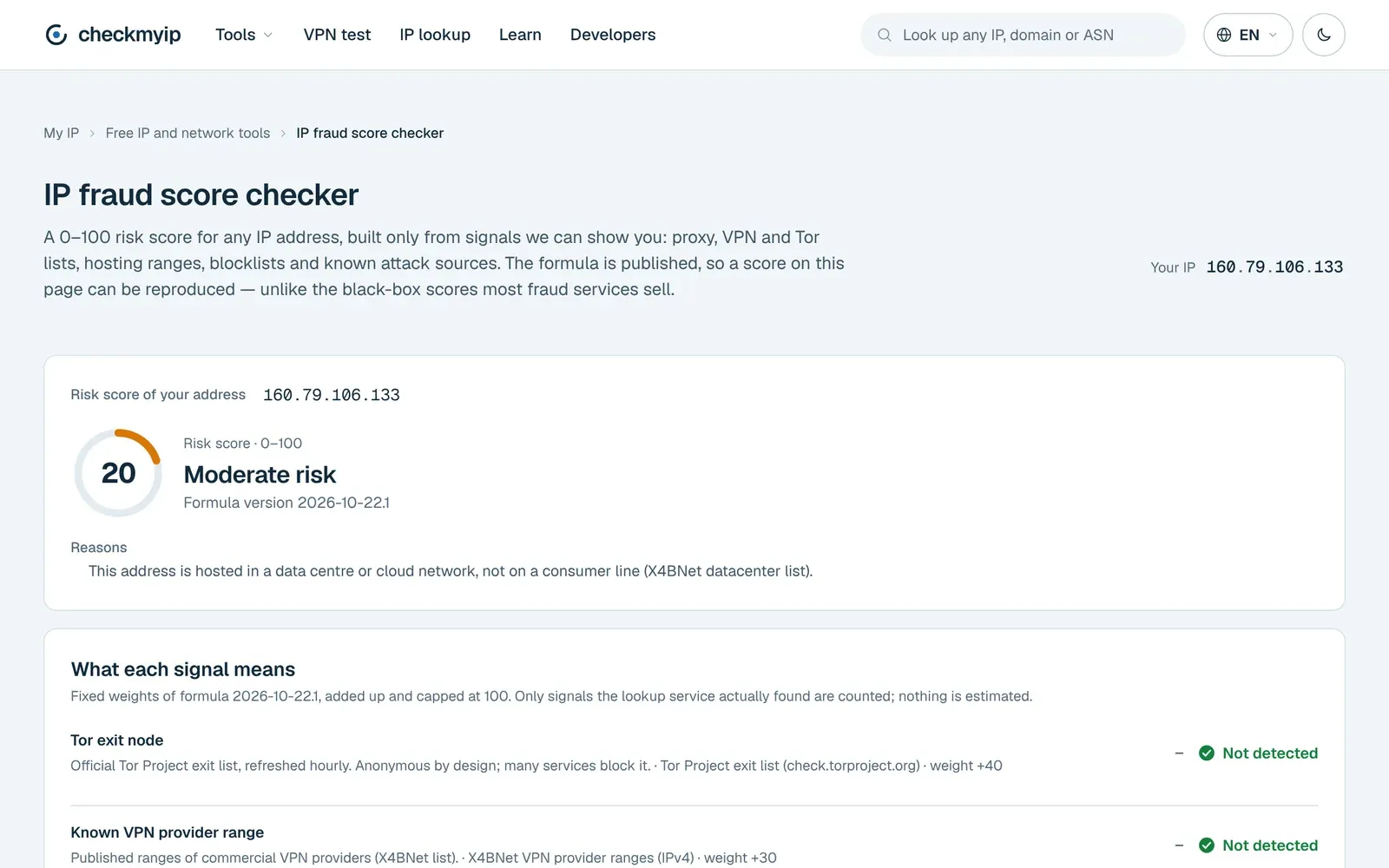
If all four come back residential, clean and unflagged and you still have a blocked IP address on that one site, you are looking at Signal 3. Or the block is not about the IP at all, such as a browser fingerprint or a phone number the site already knows. Switching networks tells them apart: a shared-IP problem leaves with the address; a device or identity problem follows you.
What to do when a website blocked your IP
The fix follows the signal; nothing here lifts a block on a site you do not control, it changes what the site sees.
- Change the address and retry. Switch the device to mobile data or another Wi-Fi network and repeat the sign-up. On a home connection, disconnect the router from the internet for a few minutes and reconnect, then confirm on the IP lookup that the address changed; many providers hand the same one back, and a CGNAT pool may give you a neighbor with the same history.
- If Signal 1 hit, stop presenting a server address to that site. A VPN or datacenter proxy is recognizable from the registry record alone, and no browser setting changes that. An address routed through a consumer ISP is what the check is designed to pass; the what is a residential proxy guide explains how such addresses are sourced and where detection still catches them. Whether that trade-off is worth it depends on what you are signing up for and on the site's terms.
- If Signal 2 hit, fix the cause before asking for removal. Spamhaus says an XBL-listed address is relisted the next time it connects if the infected or misconfigured device is still there; removal requests go only through its own lookup page. Every row of the blacklist check links to the operator's removal process. A PBL listing is policy, not reputation, and needs no action for a web sign-up.
- If Signal 3 hit, wait or move. A rate limit on a shared address expires on its own; a reputation penalty on a CGNAT pool clears only when the pool does. Reconnecting for a different pool address, or using a connection with a public address of your own, is the only lever you have.
- If a Cloudflare error page appears, the site owner wrote the rule. For error 1020, Cloudflare's advice to a visitor is to "provide the website owner with a screenshot of the 1020 error message"; the owner can look up the Ray ID in their security log and see which rule matched. For 1006, 1007 and 1008, Cloudflare states that its support "cannot override a customer's security settings", so a request to the site's own support is the only route.
Two things do not work. Clearing cookies or switching browsers does nothing to an IP check; the address is what failed. And creating several accounts from one address in quick succession makes every signal worse: it is the exact pattern reputation systems record, and on a shared address it penalizes everyone behind it, including your next attempt.
How long does an IP address stay blocked?
The three mechanisms keep time differently, and sites rarely tell you which one fired.
Rate limits are the shortest. Cloudflare's rate limiting rules block further requests "for the period of time defined" in the rule's mitigation timeout. The documented options run from ten seconds on the free plan to one hour on Pro and one day on Business and Enterprise, with custom periods for Enterprise customers through the API. Other platforms do not publish their limits this precisely, but the pattern is the same: wait, then retry without repeating the burst.
Blocklist listings last as long as the evidence. Spamhaus XBL listings "will automatically expire after a period of time once the malicious behavior is no longer detected", and the address is relisted if it is not. PBL end-user exclusions, the opposite action, expire after one year. The blacklist check shows when each list was queried, so a listing can be rechecked after the cause is removed.
Range blocks and manual IP rules have no timer at all. An IP Access rule that blocks an ASN or an address stays until the owner deletes it, and a site that refuses hosting ranges as policy refuses them indefinitely. Private reputation scores decay on schedules the vendors do not publish; a different address is faster than waiting.
Sources
- RFC 6598: IANA-Reserved IPv4 Prefix for Shared Address Space
- RFC 6269: Issues with IP Address Sharing
- Spamhaus: Policy Blocklist (PBL)
- Spamhaus: Exploits Blocklist (XBL)
- Cloudflare Docs: Rate limiting rules
- Cloudflare Docs: IP Access rules
- Cloudflare Docs: Error 1006, 1007, 1008 or 1106 (Access Denied: Your IP address has been banned)
- Cloudflare Docs: Error 1020 (Access denied)
- AWS Documentation: AWS IP address ranges
- Apple Developer: Prepare your network or web server for iCloud Private Relay
- Google Search Help: "Unusual traffic from your computer network"
- Tor Project: bulk exit list (check.torproject.org)
Questions
How do I unblock my IP address?
You cannot unblock an address on a site you do not run; you change what the site sees. Move to a different IP (mobile data, another network), remove the cause behind a blocklist listing and request delisting, or stop using the datacenter range the site refuses. A Cloudflare error code can only be lifted by the site owner.
What to do if IP is blocked?
First find out which check failed. Run the IP lookup, proxy check, fraud score and blacklist check on the address. A datacenter or VPN verdict means the range is the problem; a blocklist listing names the list and its removal page; a clean residential address that is still blocked points to a shared IP, so switch networks and retry.
How long does an IP address stay blocked?
It depends on the mechanism. Rate limits expire by themselves; Cloudflare's rate limiting rules block for a configured mitigation timeout between ten seconds and one day. Spamhaus XBL listings expire automatically once the behavior stops. A block on an IP range or ASN written by a site owner has no timer and lasts until the owner removes it.
How to stop IP blocking?
Stop presenting a flagged address. Use a connection whose address is registered to a consumer or mobile ISP, keep every device on it free of malware so the address is not listed again, avoid bursts of requests that trip rate limits, and do not share one exit address across many accounts or sessions, because the site counts them together.
Back to your own address: check my IP