IPv6 Address Examples: fe80::, 2001:, ::1, Link-Local vs Global
IPv6 address examples decoded: what 2001:, fe80::, fd00::, ::1 and ::ffff: mean, the :: compression rules, link-local vs global, and why a device has several.
 Kevin McDonnell 10 min read
In this guide
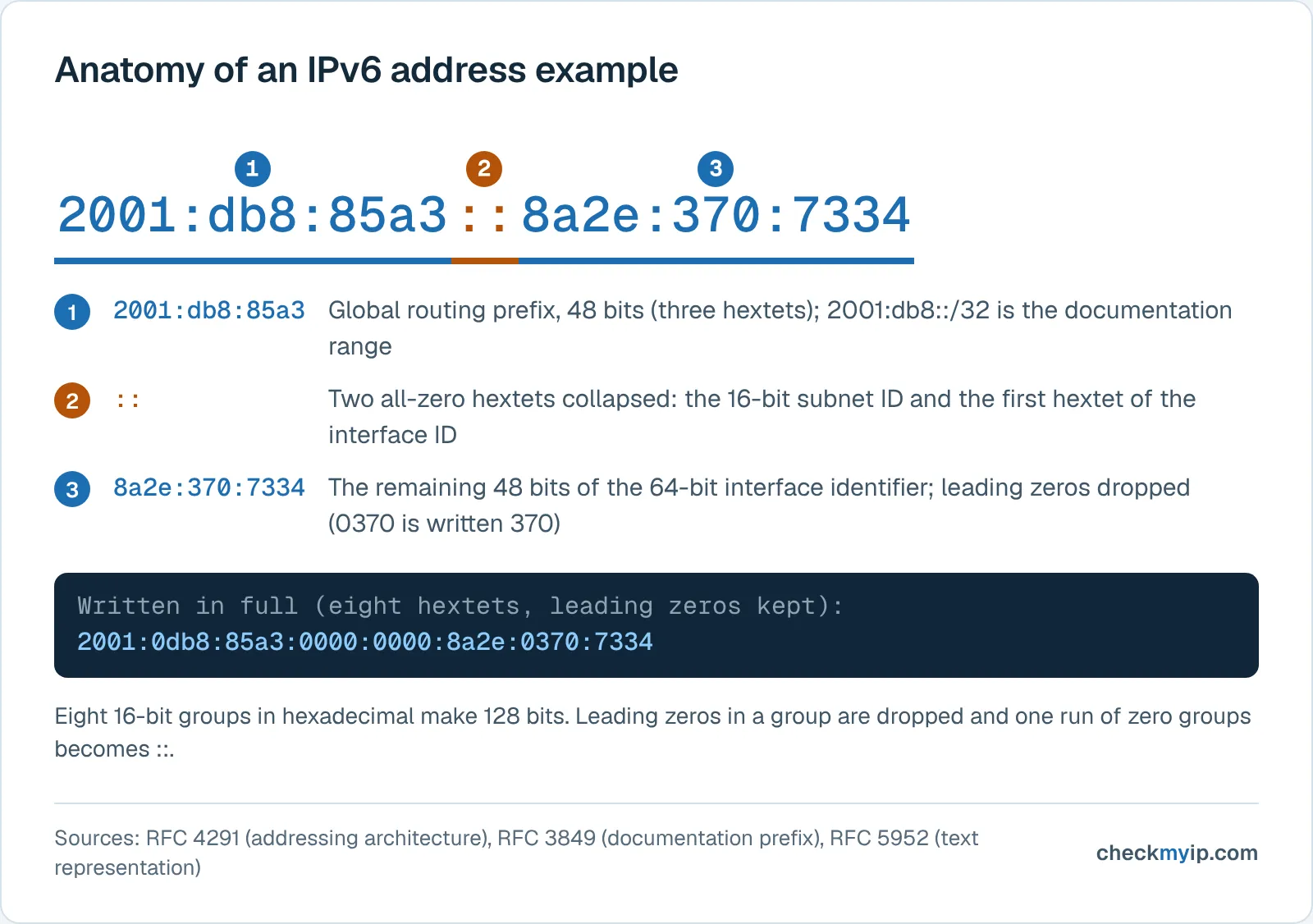
An IPv6 address example such as 2001:db8:85a3::8a2e:370:7334 shows the format: 128 bits as eight groups of hexadecimal digits separated by colons, with one run of zeros collapsed to ::. The first group gives the type: 2000 to 3fff is public (global unicast), fe80 is link-local and never leaves your network, fd is private unique local, ::1 is loopback.
Test it now
CheckingRunning against our own test servers. Nothing is stored.
Open the IPv6 test
IPv6 address format: 128 bits in eight hextets
An IPv6 address is a 128-bit number. RFC 4291 (section 2.2) writes it as x:x:x:x:x:x:x:x, where each x is one to four hexadecimal digits for one 16-bit piece, usually called a hextet or group. Hexadecimal digits run 0 to 9 and a to f, so a group covers 0000 to ffff.
In 2001:0db8:85a3:0000:0000:8a2e:0370:7334, the first four groups are the first 64 bits and name the network; the last four name one interface on it. RFC 4291 requires a 64-bit interface identifier for every global unicast address outside the binary-000 range, which is why a home or office network is a /64.
The prefix length follows a slash, as in CIDR notation for IPv4: 2001:db8:85a3::/64 is that network. Shorter prefixes define the special ranges below: fe80::/10 fixes only the first ten bits, 2000::/3 only the first three.
How to shorten an IPv6 address: the two zero rules
The full form is rarely what you see. RFC 4291 allows two shortcuts and RFC 5952 turns them into rules, so every address has one canonical spelling:
- Drop leading zeros inside a group. 0db8 becomes db8, 0370 becomes 370, and 0000 becomes 0. RFC 5952 says leading zeros MUST be suppressed, so 2001:0db8::0001 is written 2001:db8::1.
- Replace one run of consecutive all-zero groups with ::. The :: may appear only once (RFC 4291), it must cover the longest run of zero groups, and when two runs tie the first one is compressed. RFC 5952 also forbids :: for a single zero group: 2001:db8:0:1:1:1:1:1 is correct, 2001:db8::1:1:1:1:1 is not.
- Use lowercase. RFC 5952 requires a to f in lowercase; FE80:: and fe80:: are the same address, but fe80:: is the canonical form.
Worked example. Start from 2001:0db8:0000:0000:0000:ff00:0042:8329. Rule 1 gives 2001:db8:0:0:0:ff00:42:8329. Rule 2 collapses the three zero groups into 2001:db8::ff00:42:8329. To expand it again, count the groups present (five), so :: stands for three missing groups, and pad each back to four digits. With a port, use square brackets, [2001:db8::1]:80, because 2001:db8::1:80 could be read as a ninth group.
IPv6 address examples and what each one means
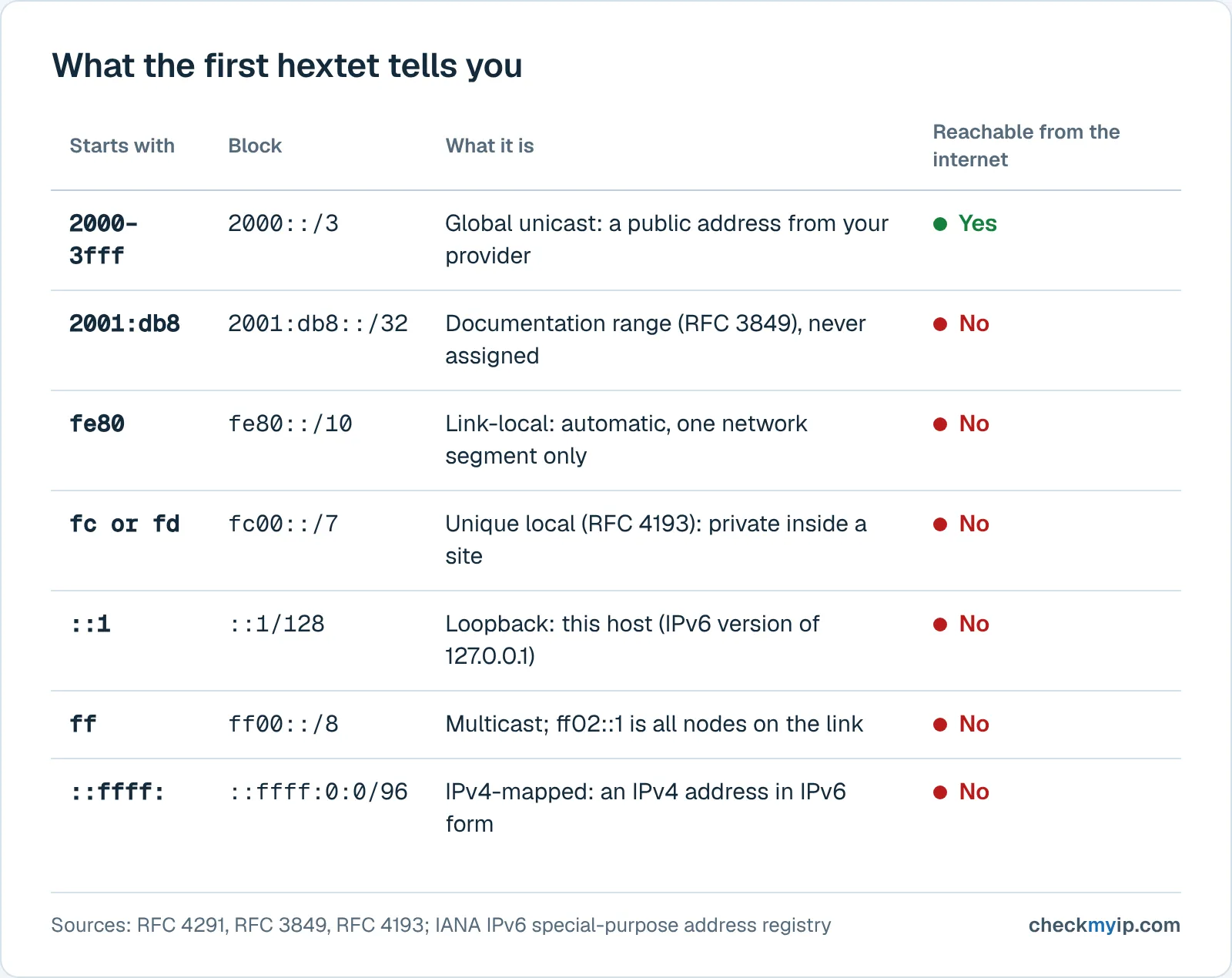
Each block below is listed in the IANA IPv6 Special-Purpose Address Registry or the Global Unicast registry; the last column follows the registry's Globally Reachable field.
| Example address | Block | What it is | Reachable from the internet |
|---|---|---|---|
| 2600:1f18:4e2:1234:5c6d:7e8f:9a0b:1c2d (illustrative) | 2000::/3, global unicast (2600::/12 is allocated to ARIN) | A public address from your provider; what a website sees | Yes |
| 2001:db8:85a3::8a2e:370:7334 | 2001:db8::/32, documentation (RFC 3849) | Reserved for examples and manuals; never assigned | No |
| fe80::1c2a:3b4c:5d6e:7f80 | fe80::/10, link-local unicast (RFC 4291) | Automatic address for one network segment; never forwarded | No |
| fd12:3456:789a:1::1 | fc00::/7, unique local (RFC 4193) | Private address inside a site; routable locally only | No |
| ::1 | ::1/128, loopback | This host, the IPv6 version of 127.0.0.1 | No |
| :: | ::/128, unspecified | No address yet, used while an interface configures | No |
| ff02::1 | ff00::/8, multicast, scope 2 (link) | All nodes on the link; ff02::2 is all routers | No |
| ::ffff:192.0.2.1 | ::ffff:0:0/96, IPv4-mapped (RFC 4291) | An IPv4 address in IPv6 form, for dual-stack software | No |
The 2600 address is made up because any real address in that block belongs to someone. The 2001:db8 address appears in nearly every tutorial, and that is why it is safe: RFC 3849 says no end party is to be assigned it and asks operators to filter it as non-routable, so if it appears in your own settings, something is misconfigured.
What fe80:: means: the link-local address
A link-local address is an IPv6 address valid only on the network segment (the link) the interface is attached to. RFC 4291 reserves fe80::/10: the first ten bits are fixed at binary 1111111010, the next 54 bits are zero, and the last 64 bits are the interface identifier. The ten-bit prefix would allow first groups from fe80 to febf, but because the following 54 bits are always zero, a real link-local address always begins fe80::.
Every IPv6 interface creates one by itself. RFC 4862 describes the first step of stateless autoconfiguration: combine the well-known link-local prefix with an interface identifier, then run Duplicate Address Detection to confirm no neighbor uses it. No router or server is needed, so a laptop with no internet connection still shows an fe80:: address, and two devices joined by one cable can talk over IPv6.
The address never travels further than that link. RFC 4291 states that routers must not forward packets with link-local source or destination addresses to other links. It cannot cross your home router, so it is never the address a website sees and never appears in an IPv6 leak test. IPv6 uses link-local addresses for the work of the link itself, including the Router Advertisements that hand out everything else, so a default IPv6 gateway shown as fe80::1 or similar is normal.
The IPv4 counterpart is the 169.254.x.x address, with one difference: on IPv4 it signals that DHCP failed, while on IPv6 the fe80:: address is always present next to the global one and says nothing about whether the connection works.
What 2001: and other 2000::/3 addresses mean: global unicast
A global unicast address is a public IPv6 address reachable from anywhere on the internet, the equivalent of a public IPv4 address. IANA's Global Unicast Address Assignments registry defines the assignable space as 2000::/3: the first three bits are binary 001, so the first group of every public address falls between 2000 and 3fff. IANA allocates blocks to the five regional registries, which allocate to providers, which assign a prefix to your connection.
The first group therefore hints at where the provider got its space: the registry lists 2400::/12 for APNIC (Asia-Pacific), 2600::/12 for ARIN (North America), 2800::/12 for LACNIC (Latin America), 2a00::/12 for RIPE NCC (Europe and the Middle East) and 2c00::/12 for AFRINIC, among others. A 2001: address is not special in itself; 2001:200::/23 through 2001:b000::/20 are ordinary regional blocks, and only sub-ranges such as 2001:db8::/32 (documentation) or 2001::/32 (Teredo tunneling) carry a reserved meaning.
The provider's prefix is the first 48 to 64 bits and the device fills in the rest, so two devices in one home share the first four groups and differ in the second half. The IPv4 vs IPv6 guide explains how that prefix replaces the one shared public IPv4 address NAT gives a household.
Private, loopback, multicast and IPv4-mapped prefixes
Unique local addresses (fc00::/7) are the IPv6 version of private addresses. RFC 4193 calls them "globally unique" yet "intended for local communications, usually inside of a site", and says they "are not expected to be routable on the global Internet". After the 7-bit prefix comes an L bit, a 40-bit random Global ID, a 16-bit subnet ID and the 64-bit interface ID; the L bit is 1 for locally assigned prefixes, the only case defined, so every ULA begins with fd. The IANA registry marks fc00::/7 as forwardable but not globally reachable: your router may route it between rooms, the internet never will. Some routers hand out a ULA alongside the public prefix, so a device can show an fd address next to its 2xxx one.
Loopback (::1) is this host, as 127.0.0.1 is on IPv4, but a single address rather than a /8. The unspecified address (::) means no address, and ::/0 is the default route.
Multicast addresses begin ff (ff00::/8). The last digit of the first group is the scope: RFC 4291 lists 2 as link-local, 5 as site-local and e as global. ff02::1 reaches all nodes on the link and ff02::2 all routers; ff02::1:2 is how a DHCPv6 client finds servers (RFC 8415). IPv6 has no broadcast address; these groups do that job.
IPv4-mapped addresses (::ffff:0:0/96) place a 32-bit IPv4 address behind 80 zero bits and ffff, so software handling IPv6 sockets can represent an IPv4 peer as ::ffff:192.0.2.1; RFC 4291 permits the mixed notation x:x:x:x:x:x:d.d.d.d for this case. You meet these in server logs, not on your network interface.
Link-local vs global on your own device, and the %zone-id suffix
The first group tells you: fe80 is link-local, 2000 to 3fff is global, fd is unique local. Where to look:
- Windows 10 and 11: run ipconfig in a command prompt. Microsoft's reference says it displays IPv4 and IPv6 addresses, subnet mask and default gateway for every adapter; each adapter lists its global address or addresses and a separate link-local IPv6 address line.
- macOS (Apple's current macOS User Guide): Apple menu, System Settings, Network, select your connection, click Details, then TCP/IP to see the IPv6 addresses; in Terminal, ifconfig lists them on inet6 lines.
- Linux: ip -6 addr shows each address with a scope word, scope link for fe80:: and scope global for public and unique local addresses.
- Any device: open the IPv6 test, which prints the global address the connection uses from the outside, with nothing link-local in it.
The suffix after a percent sign, fe80::1c2a:3b4c:5d6e:7f80%12 on Windows or fe80::1c2a:3b4c:5d6e:7f80%eth0 on Linux, is a zone ID. RFC 4007 defines the notation address%zone_id for addresses whose scope is not global: every interface has its own fe80:: address and may reach a different link, so the operating system needs to know which link you mean. Its examples include fe80::1234%1 (a numeric interface index) and fe80::1234%ne0 (an interface name); Windows prints the index, Linux and macOS the name. The zone ID is local to your machine, so drop it when copying an address for another device.
Why your device has several IPv6 addresses
An IPv6 interface normally holds three or more addresses at once, each from a different mechanism:
- A link-local address, created by the interface itself under RFC 4862 before any router is heard.
- One or more global addresses from stateless autoconfiguration (SLAAC). RFC 4862 forms them by appending an interface identifier to each prefix a router announces in its Router Advertisements. The identifier was historically derived from the hardware (MAC) address (modified EUI-64), which exposes the device across networks; RFC 7217 defines the alternative most systems now use, a stable identifier that is constant on one network, changes on another and does not reveal the hardware address.
- A temporary address for the same prefix, defined by RFC 8981. The host generates a randomized interface identifier, uses it for outgoing connections and replaces it on a schedule: the preferred lifetime defaults to one day, the valid lifetime to two. RFC 6724, the address-selection standard, prefers a temporary source address over a public one (rule 7), which is why websites, and the IPv6 test, see the temporary address rather than the stable one in your settings. On Linux the use_tempaddr sysctl controls it, with a kernel default of 0 (off) for most devices.
- A DHCPv6 address when the network runs a DHCPv6 server. RFC 8415 describes a client/server protocol that assigns addresses statefully or hands out only parameters such as DNS servers, and that operates "either in place of or in addition to" SLAAC. Corporate networks use it; most home routers rely on SLAAC.
So a settings panel shows an fe80:: address, a stable 2xxx address, a temporary 2xxx address that changes daily, and possibly an fd address. All share the network prefix, and RFC 8981 states the limit: "the network-prefix portion of an address also serves as a constant identifier". A changing interface identifier hides which device you are, not which network you are on.
What the CheckMyIP IPv6 test shows you
The IPv6 test fetches from an IPv4-only, an IPv6-only and a dual-stack host. It reports a verdict (IPv4 only, dual-stack with IPv6 or IPv4 preferred, IPv6 only, or offline), shows your IPv6 address in full and in its shortest form, and says whether IPv4 and IPv6 come from the same network. Reading the result:
- The address begins with a group between 2000 and 3fff: your global unicast address, almost always the temporary one. Its first four groups match any 2xxx address in your settings; the last four differ.
- No fe80:: or fd address ever appears, because neither can reach the test server. If your settings show only fe80:: and the test says IPv4 only, your provider or router is not delivering a global prefix; the test page lists what to check.
- The address changes from one day to the next while the first half stays the same: RFC 8981 at work, not a new connection.
- IPv4 and IPv6 from different networks: with a VPN connected this is the pattern of an IPv6 leak, and the IPv6 leak guide covers the fix.
Nothing about your visit is stored; results are computed in memory and cached for at most ten minutes.
Sources
- RFC 4291: IP Version 6 Addressing Architecture
- RFC 5952: A Recommendation for IPv6 Address Text Representation
- RFC 4193: Unique Local IPv6 Unicast Addresses
- RFC 4862: IPv6 Stateless Address Autoconfiguration
- RFC 8981: Temporary Address Extensions for Stateless Address Autoconfiguration in IPv6
- RFC 7217: A Method for Generating Semantically Opaque Interface Identifiers with IPv6 SLAAC
- RFC 8415: Dynamic Host Configuration Protocol for IPv6 (DHCPv6)
- RFC 6724: Default Address Selection for Internet Protocol Version 6 (IPv6)
- RFC 3849: IPv6 Address Prefix Reserved for Documentation
- RFC 4007: IPv6 Scoped Address Architecture (zone ID notation)
- IANA IPv6 Special-Purpose Address Registry
- IANA IPv6 Global Unicast Address Assignments
- Apple macOS User Guide: Use DHCP or a manual IP address on Mac (TCP/IP settings)
- Microsoft Learn: ipconfig (Windows commands reference)
- Linux kernel documentation: IP Sysctl (use_tempaddr, addr_gen_mode, temp_valid_lft)
Questions
What is an example of an IPv6 address?
2001:db8:85a3::8a2e:370:7334 is a valid example from the documentation range 2001:db8::/32, which RFC 3849 reserves so that examples never collide with real networks. Written in full it is 2001:0db8:85a3:0000:0000:8a2e:0370:7334. A real public address from your provider begins with a group between 2000 and 3fff, such as 2600 or 2a00.
What does fe80 mean in an IPv6 address?
fe80 marks a link-local address, defined in RFC 4291 as the prefix fe80::/10. Every IPv6 interface gives itself one automatically, routers must not forward packets carrying it to other links, and it works only between devices on the same network segment. It is the IPv6 counterpart of the IPv4 169.254.x.x address.
Is a link-local address the same as a private IP address?
No. A link-local address (fe80::/10) is valid on one network segment only and is never routed, not even inside your home. The IPv6 equivalent of a private IPv4 range is the unique local address, fc00::/7 from RFC 4193, which routers inside a site can forward but which is not reachable from the internet.
What does the /64 in an IPv6 address mean?
The /64 is a prefix length: the first 64 bits identify the network and the remaining 64 bits identify the interface on it. RFC 4291 requires a 64-bit interface identifier for all global unicast addresses outside the binary-000 range, which is why a home or office IPv6 network is almost always a /64.
Can an IPv6 address contain an IPv4 address?
Yes. RFC 4291 defines the IPv4-mapped form ::ffff:a.b.c.d, 80 zero bits, then ffff, then the 32-bit IPv4 address, so an IPv6 socket can represent an IPv4 peer. An address such as ::ffff:192.0.2.1 appears in server logs and software, not on the wire; the IANA registry lists ::ffff:0:0/96 as not forwardable.
Back to your own address: see your public IP